
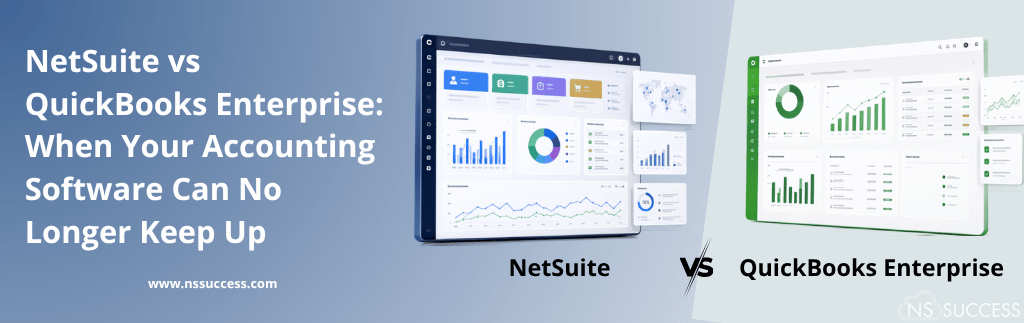
There comes a point when a growing business starts to see the limitations of QuickBooks Enterprise. A monthly financial close that once took a few days may start taking much longer. Finance teams may need to export data into Excel to combine information from different locations or companies. Inventory numbers may require additional checking, and connecting systems such as CRM, e-commerce, or payroll can involve extra manual work to keep data updated.
QuickBooks Enterprise works well for many small and mid-sized businesses and provides strong accounting capabilities. But as a company grows, its financial and operational needs become more complex. QuickBooks Enterprise focuses mainly on accounting, while NetSuite provides a complete ERP platform that brings finance, inventory, orders, CRM, and other business processes together in one system.
This article breaks down the real differences between NetSuite and QuickBooks Enterprise, the specific signs that indicate your business has outgrown QuickBooks, and what a move to NetSuite actually looks like in practice.
Why Companies Start With QuickBooks Enterprise in the First Place
It is worth acknowledging why QuickBooks Enterprise became the starting point for so many businesses. It is affordable, relatively easy to set up, and familiar to most accountants and bookkeepers, which makes onboarding straightforward in the early stages of a company’s growth. For a single-location business with simple inventory needs and a small finance team, it can genuinely be the right tool for the job for several years.
The problem is not that QuickBooks Enterprise is poorly built. It is that the software was designed around the needs of a small business at a specific stage of growth, and was never intended to manage the complexity that comes with multiple entities, international operations, or high transaction volumes. Businesses do not fail because they chose QuickBooks Enterprise — they eventually outgrow it, the same way a company outgrows a smaller office space, simply because the operational demands have changed.
Understanding the Core Difference: Accounting Software vs ERP
The most important distinction between NetSuite and QuickBooks Enterprise is not features. It is a category. QuickBooks Enterprise is accounting software with added capabilities for inventory, reporting, and light operational management layered on top. NetSuite is a cloud enterprise resource planning system, built from the ground up to unify financials, inventory, order management, procurement, CRM, and reporting inside a single database.
That distinction matters more than any individual feature comparison because it determines how each platform behaves as a business scales. QuickBooks Enterprise adds capacity by adding more workarounds, more add-ons, and more manual reconciliation between disconnected systems. NetSuite adds capacity by extending a single connected platform that already spans the whole business.
Signs Your Business Has Outgrown QuickBooks Enterprise
Most companies do not wake up one day and decide to replace their accounting system. The decision usually builds gradually, as the same operational pain points keep resurfacing month after month. The most common signs include:
- Financial close is taking longer every quarter instead of getting faster
- Finance teams rely on spreadsheets to consolidate data across multiple entities, locations, or currencies
- Inventory tracking is inaccurate or requires manual reconciliation against a separate warehouse or fulfillment system
- Reporting requires exporting data out of QuickBooks and rebuilding it elsewhere to get a real-time view
- The business has expanded into new sales channels, subsidiaries, or geographies that QuickBooks was never designed to support
- User limits and performance slowdowns are becoming a daily frustration as more people need access
- Integrations with CRM, e-commerce, or payroll platforms feel fragile and require constant manual intervention
- Leadership cannot get a real-time, company-wide view of financial performance without waiting on manual reports
If two or three of these sound familiar, it is worth taking a closer look at what NetSuite offers. If most of them sound familiar, the cost of staying on QuickBooks Enterprise is likely already higher than the cost of migrating, even if that cost is not showing up on a single line item.
NetSuite vs QuickBooks Enterprise: A Feature-by-Feature Comparison
| Feature | QuickBooks Enterprise | NetSuite |
| Financial Management | Good for basic accounting and single-company financials. | Handles complex finances, multiple companies, currencies, and revenue management. |
| Inventory & Order Management | Good for basic inventory and simple orders. | Manages inventory across locations and connects inventory with orders and finances. |
| Scalability | Works well for small and growing businesses but has some limits. | Can grow with the business, including large and global companies. |
| Reporting & BI | Basic reports are available. Advanced reports may need Excel or other tools. | Offers real-time dashboards, KPIs, and reports in one system. |
| Customization & Automation | Limited customization and may need add-ons. | Offers workflows, automation, saved searches, and SuiteScript. |
| Integrations | Mostly depends on third-party integrations. | Offers built-in integrations and tools for custom integrations. |
| Multi-Entity & Global Operations | Managing multiple companies can require separate files and manual consolidation. | Supports multiple companies, currencies, and tax locations in one system. |
Total Cost of Ownership: Looking Beyond the Sticker Price
On the surface, QuickBooks Enterprise often looks like the lower-cost option, and for a small, single-entity business with simple operations, it frequently is. But total cost of ownership goes beyond the software subscription. It includes the add-ons required to patch gaps in functionality, the staff hours spent on manual reconciliation and spreadsheet work, the cost of reporting delays that slow down decision-making, and the eventual cost of a disruptive migration once the business finally does outgrow the platform.
NetSuite typically carries a higher upfront cost. But for businesses that have already outgrown basic accounting software, that cost is frequently offset by the time saved on manual processes, the reduction in third-party add-on subscriptions, and the operational efficiency gained from running the business on a single connected platform instead of a patchwork of disconnected tools.
Industry-Specific Considerations
The decision to move from QuickBooks Enterprise to NetSuite often looks different depending on the industry a business operates in, since different sectors run into the limits of basic accounting software in different ways.
Retail and E-Commerce: Retail and e-commerce businesses often hit a wall first with inventory and order management, particularly once they are selling across multiple channels or marketplaces. QuickBooks Enterprise struggles to keep inventory counts accurate across channels in real time, while NetSuite natively connects order management, inventory, and financials, so a sale on any channel updates inventory and the general ledger simultaneously.
Distribution and Wholesale: Distribution companies frequently need multi-location inventory visibility, demand planning, and pricing rules that vary by customer or region — all of which go well beyond what QuickBooks Enterprise was built to handle. NetSuite’s advanced inventory and order management capabilities are typically a much closer fit for these operational demands.
Professional Services: Services businesses tend to hit their limits around project accounting, revenue recognition, and resource management rather than inventory. NetSuite’s project management and revenue recognition capabilities allow services firms to track profitability by project or engagement in ways that are difficult to replicate cleanly in QuickBooks Enterprise.
Manufacturing: Manufacturers often need work order management, bill of materials functionality, and shop floor visibility that QuickBooks Enterprise simply does not offer without extensive third-party add-ons. NetSuite’s manufacturing capabilities are built into the core platform, connecting production directly to inventory and financial reporting.
What Migrating From QuickBooks Enterprise to NetSuite Actually Looks Like
Step 1: Assess Current Processes and Pain Points
A good migration starts with an honest assessment of where QuickBooks Enterprise is breaking down, which manual workarounds exist today, and which business processes need to be redesigned rather than simply replicated in the new system.
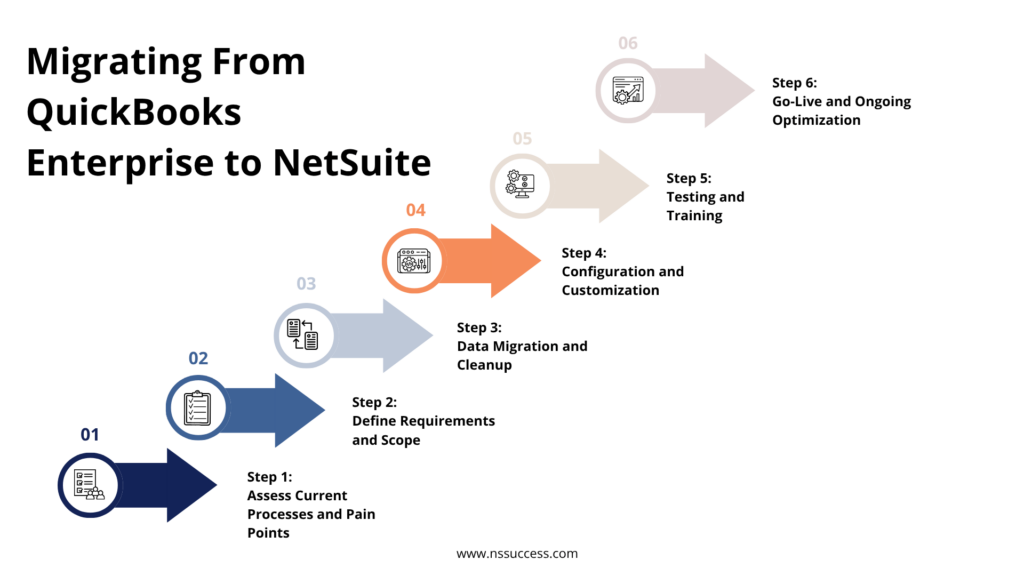
Step 2: Define Requirements and Scope
This includes identifying which modules the business actually needs, such as financials, inventory, order management, or CRM, and defining how many entities, currencies, and locations the new system needs to support from day one.
Step 3: Data Migration and Cleanup
Historical financial data, customer records, vendor records, and inventory data need to be cleaned and mapped before they are migrated into NetSuite. This step is often where the real value of an experienced implementation partner shows up, since messy data carried over from QuickBooks can undermine reporting accuracy in the new system if it is not addressed first.
Step 4: Configuration and Customization
NetSuite is configured to match the business’s actual chart of accounts, approval workflows, reporting structure, and automation needs, rather than forcing the business to adapt its processes to fit a rigid template.
Step 5: Testing and Training
Before go-live, the system is tested against real business scenarios, and finance and operations teams are trained on the new platform so the transition does not create a productivity gap in the first few months after launch.
Step 6: Go-Live and Ongoing Optimization
After go-live, the relationship with an implementation partner should continue, with ongoing support to refine workflows, add functionality as the business grows, and make sure the platform keeps delivering value well beyond the initial launch.
Who Should Consider Making the Move
Not every business needs NetSuite, and not every business should move away from QuickBooks Enterprise. The businesses that tend to benefit most from making the switch typically share a few characteristics:
- Operating multiple entities, subsidiaries, or locations that currently require manual consolidation
- Managing inventory across multiple warehouses or sales channels
- Experiencing rapid growth that is starting to strain existing systems and processes
- Expanding internationally and needing multi-currency or multi-jurisdiction support
- Spending significant staff time on manual reporting, reconciliation, or spreadsheet-based workarounds
- Preparing for a future funding round, acquisition, or IPO that will require more sophisticated financial reporting
Common Mistakes Companies Make When Evaluating This Decision
- Comparing only the subscription cost of each platform instead of the total cost of ownership
- Waiting until systems are already breaking down under pressure before starting the evaluation process
- Underestimating the data cleanup and migration work required to move successfully
- Choosing an implementation partner based on price alone rather than relevant industry experience
- Failing to involve operations and other departments in the decision, treating it as a finance-only project
- Not planning for training and change management, which often determines whether a migration actually delivers value
Why the Right NetSuite Implementation Partner Matters
Migrating from QuickBooks Enterprise to NetSuite is a significant undertaking, and the outcome depends heavily on the quality of the implementation. The right partner will assess your current processes honestly, design a NetSuite configuration that reflects how your business actually operates, manage data migration carefully to protect reporting accuracy, and provide the training and ongoing support needed to make sure the new system delivers on its promise.
How NSSuccess Helps
- QuickBooks to NetSuite migration planning and execution
- NetSuite implementation tailored to your industry and business model
- Data migration and cleanup to protect the accuracy of your financial reporting
- Custom workflows, dashboards, and automation built around how your team actually works
- Ongoing support and optimization as your business continues to grow
Conclusion: Recognizing When It Is Time to Move On
QuickBooks Enterprise served its purpose well for a lot of businesses at an earlier stage of growth. But accounting software designed for small business simplicity eventually runs into the operational complexity of a growing company, whether that shows up as a slower close, disconnected inventory data, fragile integrations, or a finance team that spends more time reconciling spreadsheets than analyzing performance.
NetSuite exists to solve exactly this problem, offering a single connected platform that scales with the business rather than requiring more workarounds as it grows. Recognizing the signs early and planning a thoughtful migration rather than waiting for a breaking point makes the difference between a disruptive transition and a smooth one.
Frequently Asked Questions
Is NetSuite more expensive than QuickBooks Enterprise?
NetSuite typically has a higher upfront subscription cost than QuickBooks Enterprise. However, when total cost of ownership is considered, including add-ons, manual labor, and reporting delays, many businesses that have outgrown QuickBooks find NetSuite delivers better overall value once those hidden costs are factored in.
Can NetSuite replace QuickBooks Enterprise and all of its add-ons at once?
In most cases, yes. Because NetSuite unifies financials, inventory, order management, and CRM in a single platform, it can often replace QuickBooks Enterprise along with several of the third-party add-ons businesses use to patch gaps in its functionality, reducing the total number of systems the business needs to maintain.
How long does a QuickBooks to NetSuite migration typically take?
Timelines vary based on the complexity of the business, the number of entities involved, and the condition of existing data. A straightforward single-entity migration can move faster, while a multi-entity or multi-national migration requires more time for data cleanup, configuration, and testing before go-live.
Will my team need extensive retraining after switching to NetSuite?
Some retraining is expected, since NetSuite is a more capable and more configurable platform than QuickBooks Enterprise. A well-planned implementation includes structured training so teams can work productively in the new system from day one, rather than learning by trial and error after go-live.
Does NetSuite support the same industries QuickBooks Enterprise serves?
Yes. NetSuite is used across a wide range of industries, including retail, distribution, manufacturing, professional services, and software, and can be configured to support industry-specific processes that QuickBooks Enterprise typically cannot accommodate without significant workarounds.
Can NetSuite handle multiple companies?
Yes. NetSuite can manage multiple companies, subsidiaries, currencies, and locations from one system, making it easier to manage growing and global businesses.
Is NetSuite better for growing businesses?
Yes. NetSuite is designed to support business growth. It can handle more users, transactions, locations, and business processes as the company expands.
Can NetSuite improve reporting compared to QuickBooks Enterprise?
Yes. NetSuite provides real-time dashboards, reports, and KPIs, helping managers and finance teams get a clear view of business performance without relying heavily on spreadsheets.
Ready to Find Out If Your Business Has Outgrown QuickBooks Enterprise?
NSSuccess helps growing companies evaluate whether NetSuite is the right fit and manages the migration from start to finish, from data cleanup and configuration to training and ongoing support. If financial close is taking longer, inventory data is out of sync, or your team is spending more time on spreadsheets than strategy, our NetSuite experts can help you make the move with confidence.

 “NS Success” is the NetSuite Consulting Practice of Dhruvsoft Services Private Limited – a leading NetSuite Solution Provider Partner from India – providing services worldwide …