

For many finance teams, the month-end close is still a stressful exercise. Accountants spend days collecting information, reconciling accounts, chasing departments, correcting errors, and preparing reports. By the time the numbers are final, business leaders may already be making decisions with information that is weeks old.
For a Controller, the real challenge is not simply closing the books. It is closing them accurately, consistently, and quickly enough to support business decisions. That is where Oracle NetSuite can make a significant difference.
NetSuite brings financial transactions, subsidiaries, customers, vendors, inventory, purchasing, revenue, and reporting into one connected environment. When it is properly configured, it reduces the manual work that slows down the NetSuite month-end close and gives finance teams much better visibility into progress. This article follows a practical before-and-after story from a Controller’s perspective to show how the financial close can change, and what it takes to get there.
Why Month-End Close Is Still a Finance Bottleneck
Imagine a growing company with multiple departments, increasing transaction volumes, and finance teams that have outgrown legacy accounting processes. Every month-end, the Controller faces the same question: Do we have everything needed to close the books accurately and on time?
The answer is rarely simple because financial information is often spread across multiple systems and departments:
- Accounting software
- Excel spreadsheets
- Bank statements
- Procurement and sales systems
- Inventory reports
- Expense management applications
- Email threads and department managers
The finance team must collect, reconcile, verify, and consolidate this information before preparing reliable financial statements. Even a small delay in one department can affect the entire closing process. As transaction volumes grow, manual reconciliations, spreadsheet-based reporting, and repeated follow-ups can consume significant finance resources. What should be a structured monthly process becomes a race against time, increasing the risk of errors and delaying management reporting. For growing businesses, the challenge is no longer simply closing the books. It is closing them quickly, accurately, and with confidence in the underlying data.
Before: A Typical Manual Month-End Close
Here is what the process often looks like before a modern ERP is in place.
- Step 1: Collect Financial Information: The accounting team requests sales information, purchase data, expense reports, inventory counts, bank statements, and accrual details from different teams. Much of it arrives through spreadsheets and email.
- Step 2: Reconcile Accounts: Accountants manually compare bank statements, the general ledger, accounts receivable, accounts payable, and inventory records. Every difference needs investigation.
- Step 3: Prepare Journal Entries: The team creates manual entries for accruals, prepayments, depreciation, revenue adjustments, and inter-company transactions.
- Step 4: Review Transactions: The Controller reviews unusual transactions and follows up with different departments for explanations.
- Step 5: Prepare Reports: Finance exports data and builds profit and loss statements, balance sheets, cash flow reports, and management packs by hand.
- Step 6: Final Review: Only after several rounds of reconciliation and correction can the Controller approve the close. Any late adjustment can send the team back to the start.
The Hidden Cost of a Slow Financial Close
A slow close creates far more than extra accounting work. It affects the whole organization.
- Finance team: long working hours, repetitive reconciliation, manual data entry, and a higher risk of errors.
- CFO: delayed financial visibility, slower management reporting, and less time for strategic analysis.
- CEO: a late understanding of business performance and a slower response to changing conditions.
- Operations: delayed profitability information and limited visibility into costs.
- Board and investors: less timely financial information.
The biggest problem is not how many days the close takes. It is what the business cannot do while it waits for the numbers.
Where NetSuite Changes the Close Process
Oracle NetSuite provides a unified financial management platform where accounting transactions and operational information are connected. Instead of repeatedly collecting data from separate systems, many transactions flow straight into the ERP as they happen.
This helps finance teams move from a sequence of collect, consolidate, reconcile, and report toward a sequence of capture, automate, review, close, and analyze. The objective is not to remove financial controls. It is to remove the unnecessary manual work around those controls.
After: The Controller’s Month-End Close With NetSuite
With a well-designed NetSuite implementation, the Controller starts the close with current financial data already available in the system. This reduces dependency on spreadsheets and manual data collection.
- Review the Close Checklist: Review the month-end tasks, deadlines, and assigned responsibilities. This helps the team stay organized throughout the close.
- Confirm Transactions Are Posted: Ensure required sales, purchases, expenses, and other transactions are recorded. This provides a reliable foundation for the financial close.
- Complete Reconciliations: Reconcile bank accounts, balance sheet accounts, and other relevant records. Differences can be identified and investigated more efficiently.
- Review Exceptions: Focus on unusual transactions, discrepancies, or incomplete activities. This allows the Controller to address issues before finalizing the close.
- Post Approved Adjustments: Record approved accruals, adjustments, depreciation, and other required journal entries. Proper review and approval help maintain financial accuracy.
- Close Accounting Periods: Once required activities are completed, the accounting period can be closed. This helps prevent unauthorized changes to finalized financial data.
- Generate Financial Reports: Generate profit and loss statements, balance sheets, cash flow reports, and other management reports. Reports can be produced directly from the ERP data.
- Analyze the Results: The finance team can spend more time reviewing financial performance instead of collecting information. This helps management make faster, data-driven decisions.
Automated Transaction Processing Reduces Manual Work
One of the biggest opportunities to accelerate the financial close is reducing manual transaction entry. NetSuite can connect accounting with operational processes such as sales orders, purchasing, inventory, expenses, customer payments, vendor bills, and projects. When processes are designed correctly, transactions move through predefined workflows instead of being re-entered by finance. Compare the two paths:
- Manual: sales system, then spreadsheet, then finance review, then accounting entry.
- Connected: sales transaction, then NetSuite, then accounting, then reporting.
The second path reduces duplicate data entry and gives finance a single, more reliable source of information. It also shortens the time between a business event and its appearance in the books.
Faster Account Reconciliation
Account reconciliation is one of the most time-consuming parts of the close. Controllers need confidence that balances in the General Ledger (GL) agree with supporting records.
NetSuite supports reconciliation by keeping the relevant financial information in the same environment. Finance teams can review bank activity, customer balances, vendor balances, general ledger transactions, inventory values, and inter-company balances without first assembling them from different files. Depending on configuration, bank data can also be brought in electronically to support matching.
The benefit is a change in how accountants spend their time. Instead of working out where the information came from, they focus on investigating genuine exceptions. Automation should help finance teams concentrate on exceptions rather than manually checking every transaction.
Automated Recurring Journal Entries
Recurring accounting activity also slows the close. Examples include monthly depreciation, recurring expenses, prepaid expense allocations, certain accruals, cost allocations, and other standardized adjustments.
Where appropriate, NetSuite can automate recurring journal entries. Without automation, the team has to identify, calculate, prepare, enter, and review each entry every month. With automation, entries are scheduled or generated, then reviewed and approved. The Controller keeps full oversight, but the repetitive preparation work shrinks.
Managing Accruals More Efficiently
Accruals are critical for accurate financial statements, but they become difficult when finance teams track them through email and spreadsheets. Consider a company that receives services in March while the vendor invoice arrives in April. The March expense still needs to be recognized. In a structured environment, the accounting team can:
- Identify the expense
- Record the accrual
- Review it
- Reverse or adjust it when appropriate
- Reconcile the subsequent invoice
NetSuite supports reversing journal entries, which helps standardize this routine. A consistent accrual process creates better control over recurring month-end activity and reduces the risk of expenses landing in the wrong period.
Better Revenue and Expense Visibility
Controllers need to know that revenue and expenses are recognized in the correct period. NetSuite gives finance a centralized environment for managing transactions and reporting.
Depending on the company configuration and the functionality in use, this can support revenue recognition, deferred revenue, expense allocation, prepayments, project accounting, and subscription-related accounting. As a result, finance teams spend less time manually assembling information and more time confirming that the accounting treatment is appropriate.
Multi-Entity Close: Where NetSuite Becomes Even More Valuable
The month-end close becomes much harder when a company operates several subsidiaries. Finance may need to manage multiple currencies, inter-company transactions, separate subsidiaries, consolidated reporting, and local reporting requirements at the same time. NetSuite’s multi-subsidiary capabilities, available through NetSuite OneWorld, provide a central structure for these processes.
- Before: finance consolidates Subsidiary A, Subsidiary B, and Subsidiary C by hand in a spreadsheet.
- After: a configured NetSuite environment supports subsidiaries, consolidation, and group financial reporting inside the ERP.
This reduces manual consolidation work and improves visibility into group performance.
Intercompany Accounting and the Month-End Close
Intercompany transactions are another common source of close delays. Typical examples include inter-company sales, management fees, shared services, inter-company expenses, and transfers between entities.
Without proper controls, finance teams can spend significant time finding and reconciling differences between entities. NetSuite supports structured inter-company processes, helping teams manage transactions between related entities more systematically. The practical benefit is a shift in the conversation. Instead of asking why two balances do not match, the finance team can spend its time understanding the underlying business reason.
Real-Time Dashboards Give Controllers a Better View of the Close
A modern financial close requires visibility. Controllers should be able to see what has been completed, what is outstanding, which accounts have exceptions, which subsidiaries have closed, which reconciliations need attention, and where balances look unusual.NetSuite dashboards, saved searches, and reporting tools can present information according to user roles, so each person sees what matters for their part of the close. A Controller dashboard could track the following:
| KPI | Purpose |
|---|---|
| Close status | Track overall progress |
| Unreconciled accounts | Identify outstanding work |
| AR aging | Monitor receivables |
| AP aging | Monitor payables |
| Cash position | Understand liquidity |
| Revenue | Track business performance |
| Expenses | Identify unusual movements |
| Profitability | Monitor financial performance |
Exception-Based Accounting: A Better Way to Close
One of the biggest changes a modern ERP enables is exception-based management. Instead of reviewing every transaction manually, finance teams use rules, controls, reports, and workflows to identify the items that need attention.
- Rather than reviewing every expense, review unusual or high-risk expenses.
- Rather than comparing every account manually, investigate accounts with unexplained variances.
- Rather than searching through every transaction, focus on transactions flagged by predefined controls.
This approach gives accounting professionals more time to apply financial judgment, which is where their expertise creates the most value.
Before vs. After: A Controller’s Perspective
| Area | Before NetSuite | With NetSuite |
|---|---|---|
| Data collection | Manual | Centralized |
| Spreadsheet dependency | High | Reduced |
| Reconciliation | Highly manual | More structured |
| Recurring entries | Manual | Can be automated |
| Reporting | Often delayed | More timely |
| Multi-entity consolidation | Complex | Centralized framework |
| Intercompany accounting | Manual reconciliation | Structured processes |
| Dashboards | Spreadsheet-based | Role-based ERP dashboards |
| Exception management | Difficult | More visible |
| Decision support | Delayed | More timely |
The exact improvement depends on your processes, configuration, data quality, integrations, and user adoption.
What a Faster Month-End Close Really Means
A faster close does not mean asking accountants to work faster. It means redesigning the process so fewer activities need manual intervention. A mature close process aims to reduce repetitive tasks, standardize accounting procedures, automate appropriate transactions, improve data quality, establish clear ownership, surface exceptions early, and give management visibility. The goal is not speed at the expense of accuracy. The goal is a close that is faster, accurate, controlled, and transparent.
A Practical NetSuite Month-End Close Framework
Finance teams can structure their close around five stages.
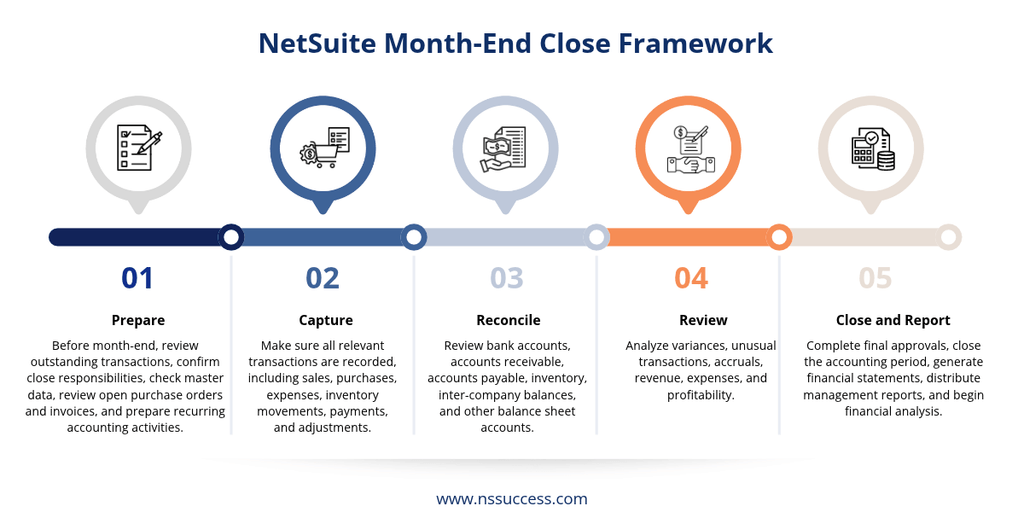
- Stage 1: Prepare – Before month-end, review outstanding transactions, confirm close responsibilities, check master data, review open purchase orders and invoices, and prepare recurring accounting activities.
- Stage 2: Capture – Make sure all relevant transactions are recorded, including sales, purchases, expenses, inventory movements, payments, and adjustments.
- Stage 3: Reconcile – Review bank accounts, accounts receivable, accounts payable, inventory, inter-company balances, and other balance sheet accounts.
- Stage 4: Review – Analyze variances, unusual transactions, accruals, revenue, expenses, and profitability.
- Stage 5: Close and Report – Complete final approvals, close the accounting period, generate financial statements, distribute management reports, and begin financial analysis.
Common Mistakes That Can Still Slow Down a NetSuite Close
Implementing NetSuite does not automatically create a fast close. A poor implementation can simply move old problems into a new system.
- Automating a bad process: If the current process is inefficient, automating it makes the wrong process faster, not better.
- Poor master data: Incorrect customers, vendors, accounts, items, or classifications create reconciliation problems.
- Excessive customization: Too much custom code makes the ERP harder to maintain and complicates future upgrades and improvements.
- Weak user adoption: If employees keep working in spreadsheets outside the ERP, finance still struggles to get complete information.
- No formal close calendar: Technology needs clear responsibilities and deadlines to deliver results.
Best Practices for Accelerating the NetSuite Financial Close
- Standardize the close process: Create one consistent checklist that covers every close activity.
- Assign clear ownership: Every task should have an owner, a deadline, a reviewer, and a status.
- Automate repetitive accounting: Identify recurring activities that can be standardized or automated.
- Reduce spreadsheet dependency: Use NetSuite as the primary source of financial information wherever practical.
- Use dashboards for visibility: Controllers should be able to see outstanding work at a glance.
- Reconcile continuously: Do not leave every reconciliation until the final days of the month.
- Review exceptions early: Identify unusual transactions and balances well before the close deadline.
- Measure close performance: Track days to close, the number of manual journal entries, reconciliation completion rate, post-close adjustments, and reporting turnaround time.
How to Measure the Success of Your NetSuite Close Transformation
The best way to demonstrate ERP value is through measurable improvement. Useful KPIs include:
- Days to close: how many business days it takes to finalize the books.
- Manual journal entry volume: how many manual entries are created each month.
- Reconciliation cycle time: how long it takes to reconcile critical accounts.
- Post-close adjustments: how many significant corrections are needed after the period is closed.
- Reporting turnaround: how quickly management receives finalized reports.
- Close task completion: how many close activities finish on time.
Capture a baseline before go-live, then track the same measures every month. These metrics give CFOs and Controllers a clear view of whether the ERP investment is delivering operational value.
A Before-and-After Story: The Controller’s Transformation
- Before: The Controller starts month-end with a list of spreadsheets. For several days, the finance team collects data, chases departments, reconciles accounts, prepares journal entries, consolidates subsidiaries, and builds management reports. Most of the Controller’s time goes to one question: where is the data?
- After: With a properly implemented NetSuite environment, the Controller starts with centralized financial information and a structured close process. The finance team focuses on reviewing exceptions, completing reconciliations, approving adjustments, analyzing variances, and producing management insight. The Controller’s question changes from “Where is the data?” to “What is the data telling us?” That is the real transformation.
Why NetSuite Implementation Quality Matters
A successful financial close transformation depends on more than software. It requires process redesign, finance requirements gathering, correct configuration, data migration, integration, user training, reporting design, change management, and continuous optimization.
An experienced NetSuite implementation partner helps identify which close activities should be automated, standardized, integrated, or redesigned. NSSuccess is the NetSuite practice of Dhruvsoft, an Oracle NetSuite Solution Provider Partner. We can support businesses with:
- NetSuite financial management implementation
- Month-end close process optimization
- Accounting automation
- Multi-entity financial management
- Reporting and dashboard development
- Data migration
- Integrations
- NetSuite support and optimization
Frequently Asked Questions
1. How does NetSuite speed up the month-end close?
NetSuite centralizes financial transactions, automates recurring journal entries, supports structured account reconciliations, and provides real-time visibility into financial activities. This helps finance teams reduce manual work, improve accuracy, and complete the month-end close more efficiently.
2. Can NetSuite automate month-end journal entries?
Yes. NetSuite supports recurring and reversing journal entries for routine accounting activities such as depreciation, prepaid expense allocations, and certain accruals. These entries can be scheduled or generated automatically while maintaining appropriate review and approval controls.
3. Does NetSuite support multi-subsidiary consolidation?
Yes. NetSuite OneWorld supports multiple subsidiaries, currencies, intercompany transactions, and consolidated financial reporting. It helps organizations manage financial information across entities within a centralized ERP environment.
4. How long does it take to shorten the close with NetSuite?
The timeline depends on existing accounting processes, data quality, system configuration, integrations, and employee adoption. Organizations can achieve better results by redesigning their financial close processes alongside NetSuite implementation.
5. How does NetSuite improve account reconciliation during month-end close?
NetSuite keeps general ledger transactions, bank activity, accounts receivable, accounts payable, and other financial information within one environment. This helps accountants identify discrepancies, investigate exceptions, and complete reconciliations more efficiently.
6. Can NetSuite help reduce spreadsheet dependency during financial closing?
Yes. NetSuite provides centralized financial data, reporting tools, dashboards, and automated workflows. Finance teams can reduce the need to collect information manually from multiple spreadsheets and use the ERP as their primary source of financial information.
7. What financial close KPIs should Controllers track in NetSuite?
Controllers can monitor several important KPIs, including days to close, manual journal entry volume, reconciliation cycle time, post-close adjustments, reporting turnaround time, and close task completion rates. These metrics help measure financial close efficiency and identify improvement opportunities.
8. Does NetSuite provide real-time visibility into month-end close activities?
Yes. NetSuite dashboards, saved searches, and reporting tools provide role-based visibility into financial activities. Controllers can monitor close progress, outstanding reconciliations, accounts receivable, accounts payable, cash positions, revenue, and expenses.
Conclusion: From Closing the Books to Understanding the Business
For Controllers, month-end close should not be a month-end fire drill. A modern financial close should deliver accurate numbers quickly while keeping the right financial controls in place.
Oracle NetSuite helps create a more connected close by bringing financial and operational information into one ERP, supporting automation, structured reconciliations, multi-entity accounting, reporting, and better visibility. The biggest benefit is not only fewer days to close. It is giving finance teams time to analyze performance, identify risks, support business leaders, and influence strategic decisions.
Before NetSuite, the close means collect, reconcile, consolidate, and report. After a well-designed NetSuite close process, it means automate, review, analyze, and decide. For a modern Controller, that is what a faster financial close should deliver.
Ready to accelerate your month-end close with NetSuite? NSSuccess helps organizations streamline financial processes, automate accounting activities, improve reporting, and build more efficient NetSuite financial close processes. Talk to our NetSuite experts at www.nssuccess.com to assess your current month-end close process and identify opportunities for automation and improvement.
 “NS Success” is the NetSuite Consulting Practice of Dhruvsoft Services Private Limited – a leading NetSuite Solution Provider Partner from India – providing services worldwide …